Understanding the Z report
The Z report is to be printed at the end of trading each day on all computers which have made any sale of any type. Day End > Z Report.
On your main POS computer, you should then follow the Z report with a Global Z report. (Please note: on some systems you will not find discrete Z and Global Z buttons as they have been combined).
In addition to printing the Global Z report, POS will also print a report from Till 29, which is your dispensary information.
We also can produce weekly and monthly Z reports, which include all of the previously closed reports for those periods. In particular, the monthly Z is useful for filling your BAS with it’s GST information. Additionally the Monthly Z report contains special information on the Government recovery (which is hard to determine daily given the variation in the pay back times from the PBS). We can have these reports automatically emailed out to yourself or your accountant, which makes reporting financials hassle-free!
The Z report differs from the X report in that the Z report closes your banking slip for the day’s trading. The X report can be run whenever one wishes, and will provide a similar report to the Z report, which can be useful for quickly gauging both till and store performance.
The Z report is formatted so that it prints nicely on your receipt printer, however we can print it on your reports printer if you prefer. Some receipt printers will cut off the Custs column, in which case it might be better to print it to your reports printer.
All Z reports are archived and can be accessed again in any case, via Day End > Reports > View Reports > Till Statistics. Along the top are icons which filter the reports by Daily, Weekly, Monthly and Yearly. When hovering over the buttons we highlight what each filter button does.

Some common misapprehensions about Z reporting:
– Chng uncollected Gov Clms (shown on monthly and yearly Z reports only).
In principle these are scripts which have been dispensed but not sold. For instance, they could be:
1. Scripts as part of parked sales (greyed out lines in the script link).
2. Waiting scripts (scripts which have been dispensed but not sold).
3. Deleted waiting scripts (scripts which have been deleted from the waiting scripts section). We do not (and can not) assume that by deleting a script you are intending on cancelling the script, so do not re balance financially in this event.
If the value on your report is radical, deleted scripts could be the culprit, and our support can help you clean this up.
– Negative figures in Dispensary profits (particularly on daily reports).
There are two primary causes of this.
1. If a script which doesn’t go through the till ($0.00 charge, or auto charged to an account) is subsequently cancelled but on a different day, then you will see the effects of this on the day that the script is cancelled. It will not amend the previous Z report. This is similar to how any other credit would work in the POS.
2. If a script has been dispensed but not collected, it will often contribute to the till stats as a loss, as the patient’s payment is missing. The effect of this is reversed when the script is collected. This is financially correct, however can obviously make assessing profit tricky on a day to day basis.
To attempt to overcome the number 2, we show a field called Adj. Profit. We collect Government pay metadata from the incoming scripts from Dispense, and add to the Adjusted Profit when a script is dispensed, and subtract from it when a script is sold. When scripts are deleted without being sold, we also subtract, as we assume the script was sold as a miscellaneous department sale for one reason or another. We do have an option you can disable which will prevent this behavior for the current session in POS. It is a little checkbox in the script link section Adjust uncollected Govt Pay. However don’t play around with this unless you are sure you understand what mechanism you are affecting!
It should be noted that generally speaking we advise that monthly Dispensary profit figures and GP percentages are more useful when assessing store performance, as daily figures, although accurate, can be dramatically affected by particularly high cost (to the patient) drugs. The effect of this is obviously softened when assessed over a longer period.
– Disparity between Government recovery on the Z report in POS and the report from your Dispense software.
POS must show the theoretical government recovery. We are downstream from any Dispensary software, and cannot make judgement calls or decisions on what is successfully claimed through the PBS and paid for, therefore we must assume that all are successfully paid. This isn’t the case in the real world, with delays in payments, cancellations, failures in the PBS, etc. Mountaintop Dispense (and this is probably the case with other Dispense softwares) provide you the actual *achieved* Government recovery in a report directly from the Dispense software.
– Three Z reports print on my POS server at the end of day, which are mostly zeroes.
You will get a Z report for the server, “till 1” (which will be full of $0 figures if you don’t use your server to make sales), a Z report for “till 29” which is your Dispense Link, so only the Dispensary half of the document will have figures, and finally the Global Z report, which totals all of the Z reports in the store together and gives you totalled figures.
– I forgot to run my Z report last night. Can I edit today’s Z report and change which dates it includes?
No. The Z report is a properly formatted banking slip. It would not be financially trustworthy if one had the ability to edit it after the fact. The POS must log precisely what is entered into it.
If you want to run a Z report for a custom time period, rather than the daily, weekly, monthly and yearly skews we provide, you can via Day End > Reports > Print Reports > Till Statistics Date Range.
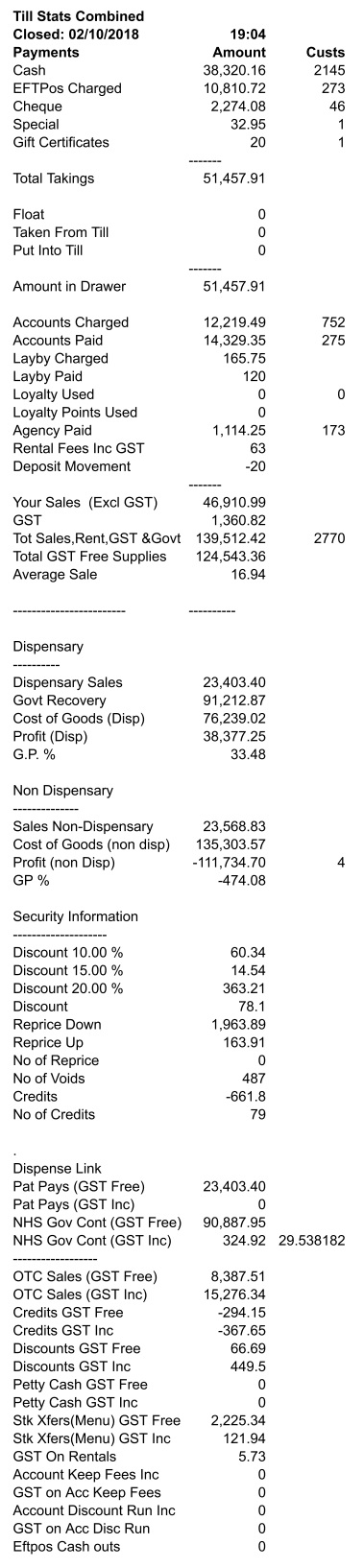
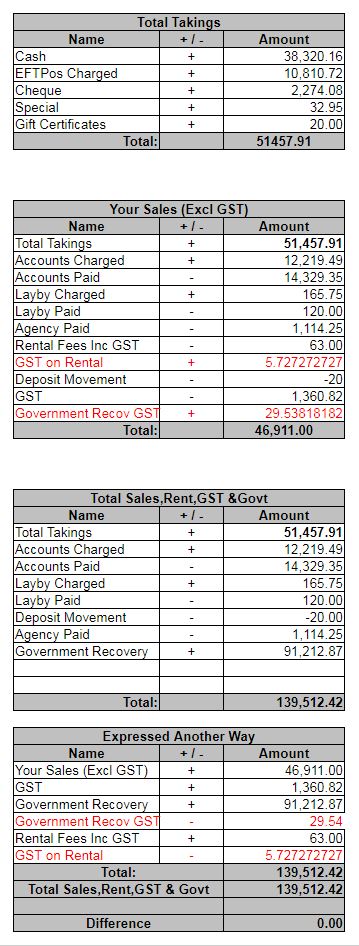
Below left is a sample of a Z report, and on the right is an explanation of how we calculate some of the totalled fields which you might use for your accounting.